Quickly open GitHub repositories in multiple cloud IDEs from your browser
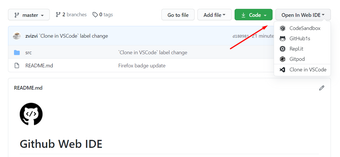
GitHub Web IDE, created by zvizvi, provides a fast bridge from repository pages to online development environments. It places a Web IDE button or dropdown on GitHub so developers can jump into a browser-hosted editor with a single click. The extension emphasizes choice among external editors while keeping the GitHub interface intact. Web developers and open-source contributors gain value when they need rapid inspections, small edits, or to run code without cloning locally.
How repository locations map to live editor sessions
The extension preserves repository and branch context when it forms the destination URL, so the same file or branch opens in the selected editor rather than landing at a repository root. It constructs the target IDE URL and navigates the browser without asking for GitHub credentials, which reduces credential handling by the extension itself and fits workflows that rely on existing authenticated browser sessions.
Which cloud IDEs are available and why that matters
Support for multiple web-based editors gives developers choice instead of a single destination. The tool exposes popular online IDEs so users can pick an environment that matches their task or project constraints, avoiding manual URL rewriting.
GitHub.dev
Gitpod
StackBlitz
CodeSandbox
Deployment, compatibility, and team considerations
Designed for standard browser environments, the extension is available for Firefox and also runs on Chromium-based browsers. Users report a lightweight footprint that does not significantly affect page load times. The curated IDE list is maintained by the developer, so visible entries and customization options depend on ongoing updates; teams should verify available editors before adopting the workflow.
Best used as a compact launcher for browser-first development workflows
Maintained by an independent developer active on GitHub and with generally positive community reception, the extension fits developers who prefer browser-hosted editing for quick tasks. Its open-source codebase supports review and forks, which teams can inspect or adapt. Treat the tool as a convenient launcher for cloud editors rather than a substitute for a full local development environment.
Pros
Adds a Web IDE button or dropdown directly on GitHub repository pages
Laws concerning the use of this software vary from country to country. We do not encourage or condone the use of this program if it is in violation of these laws. Softonic may receive a referral fee if you click or buy any of the products featured here.